By Sue Shekut, Owner, Working Well Massage, Licensed Massage Therapist, Certified Wellness Coach, ACSM Personal Trainer
A while ago I wrote about the ergonomic problems inherent is using the new iPad (and iPods and even reading books can put you in the same uncomfortable positions) Some people have theorized that Apple is counting on aftermarket vendors to come up with ergonomic products to support the nifty gadgets Apple creates. And there are a slew of aftermarket products coming out now to make your “iViewing” more ergonomic. Below is a list of some of the aftermarket products I’ve found to help you more comfortably view your iPad, smart phone, etc.
Portabook is still one of my favorites for its light weight portability, versatility, ease of use and cost. It’s not designed specially for the iPad, but it can be used to read books, cookbooks, for laptop use as well as your iPad. Why buy multiple stands when one device can work for them all! And the Portabook costs about $20 and weighs only ounces so it fits into a backpack along with your iPad easily. Hmmm, if my clients use the iPad and Portabook on the Metra their neck pain may disappear!

iLounge has a great review of a more versatile iPad holder here. iLounge recommends the Luxa2’s H4 iPad Holder for its versatility, price and polish. iLounge says that the H4 is “an iPad-matching aluminum base with a cable managing slot, and a rotating, pivoting cradle with expanding rubber-tipped metal arms that can hold a bare or encased iPad as firmly as you prefer…it feels solid and sturdy even without an iPad resting in its cradle; but unlike Griffin’s A-Frame, all of its edges are polished to prevent iPad or finger damage.”
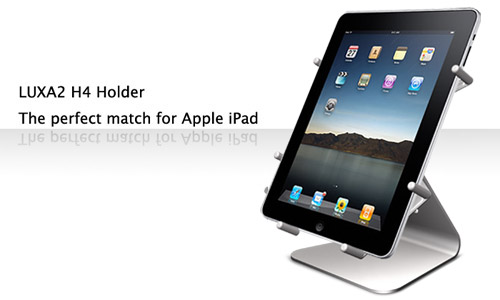
MacWorld also weighs in on the various aftermarket iPad stands. Their top vote mirrors that of iLounge: the Luxa2 H4 iPad Holder. Check out their other reviews here.
A fantastic story and video about this iPad stand designed and made by 75-year-old Dutch woodworker, Simon Blazer, is only $5! Reviewed by Wired and CrunchGear already, this simply wooden block stand is what it is-just a stand. But ti’s also only $5.

Simon Blazer and his $5 wooden iPad stand
The Articulating Easel has one of the best web presentations about the ergonomics of iPad viewing here. Their product looks very similar to the Portabook but as of today, according to the website, its’ not yet available. Ha! So you can subscribe to their mailing list and get a 10% discount on the product when it becomes available. I’d guess it will likely retail for about the same price as the PortaBook, maybe $20 to $30. But with so many other products ALREADY available, the Articulating Easel may be marketing for the competition.

The Artculating Easel in use with an iPad
The picture below shows the Articulating Easel in use on a plane. This is a great pic because it shows how much better you can sit using an iPad holder (although the Portabook could be used much the same way.)

Here’s the Articulating Easel’s diagram showing Steve Jobs uncomfortable viewing angle with the iPad:
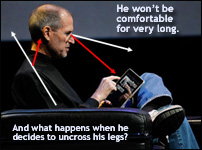
Steve Jobs viewing angle of iPad
The Articulating Easel also has a great page showing ergonomic issues with the iPad (and how aftermarket stands like the Articulating Easel can help!) Check out the ergonomic explanation here.
iGearUSA sells leather case that can hold the IPad and stand it up at a more comfortable viewing angle. Cost about $30.00. Check it out and order here.
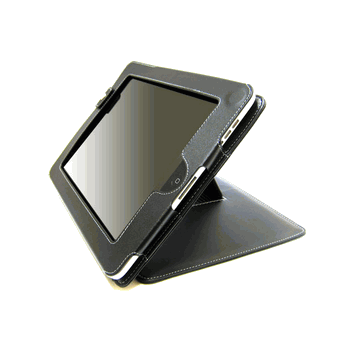
iGear iPad Stand
There is also an iPad Holder for your car. Which I DO NOT recommend. It’s bad enough that we are distracted by cell phones, board advertising, and GPS systems. now we are going to use the iPad in our cars? A scary marriage of social networking (which is already a distracting, multitasking activity) with something dangerous like operating a motor vehicle. I see the day when municipalities and state governments ban iPad use in your car!
If you have an iPad, tell us about your ergonomic issues in the Comments section. Do you like/love/hate the iPad? What do you use it for? What is your most comfortable iPad viewing position? (Downward facing dog?!)
Related articles by Zemanta
- Luxa2 H4 iPad Holder Review (slashgear.com)
- Toshiba libretto W100 Challenges Apple’s iPad (crenk.com)
- iPads Are Billed as a Green Gadget, But There’s a Not-So-Eco Catch (alternet.org)
- iPad News of the Week (thetechscoop.net)
- Element Case Joule iPad Stand Review (slashgear.com)


![Reblog this post [with Zemanta]](https://i0.wp.com/img.zemanta.com/reblog_e.png)

 Working Well Resources' Blog