By Sue Shekut, Licensed Massage Therapist, ACSM Personal Trainer, Certified Wellness Coach, Owner, Working Well Massage
Smart phones are common tools for today’s fast-paced business world. And just as computer use has improved our lives AND added a host of new ergonomic issues, “iPod Neck” and “Blackberry Neck” are concerns for many users that hold their phones while looking down.
Smart phones are not heavy. You may think holding them won’t cause muscle tension. They are easy to hold in one hand and type with the other. But holding the phone and looking down at the small screen for long periods of time can cause unwanted muscle pain in the upper back and neck. Those that use their iPod’s as a Kindle reader spend even more time looking down while viewing the device.
Think holding a small phone can’t cause any problems? Try this test yourself.
1. Hold your phone up in front of you and look down at the screen for a full 60 seconds.
2. Notice how your neck and shoulders feel as the clock ticks by.
3. Feel any uncomfortability in your muscles?
4. Now think of how you would feel after holding your phone and looking down for five minutes. Ten minutes. You get the idea.
When you use your phone or media player you are usually focusing your attention on the task at hand, not on your muscle tension. Doing this exercise makes you more aware of how you use your body when typing or viewing your smart phone.
Smart phones need smart accessories. How can you counter the muscle strain you may get while holding your iPod or Blackberry to type?
A few simple suggestions to avoid “iPod Neck.”
1. Whenever possible, rest your elbows on a table or surface so that your arms are propped up to view your smart phone. This takes pressure off your neck and shoulder muscles and let’s you work more easily. Resting your elbows on a flat surface is free! And you can take your elbows with you anywhere you go. Just make sure the table or surface is not so slow you have to slump over to reach it!)
Find this inexpensive, portable stand here
2. Purchase an inexpensive Smart phone holder to use to prop up your device when you are on the go.
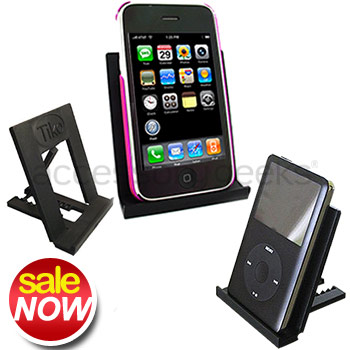
This Tiko Fold is convenient on planes, trains, at the coffee shop or at a desk. Free your hands and relax while viewing your phone or media player at one of nine adjustable viewing angles.
The Tiko Fold folds flat for slipping into a shirt pocket, backpack, computer bag, or purse. When folded into a stand, the Tiko Fold provides a universal base designed to hold the original iPhone and the iPhone 3G, Sony PSP, and practically any portable video players like your cell phone in both vertical and horizontal orientations. The Tiko Fold also holds the iPod Classic, iPod Touch, iPod Nano, BlackBerry Storm, BlackBerry Bold, most video capable cell phones, the Microsoft Zune, Sony PSP and even some ebook readers.
The Tiko stand retails for about $8.00 and can be purchased here here
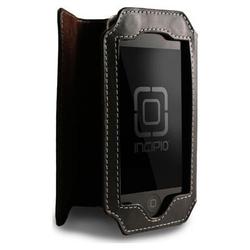
3. Another alternative for holding iPods/iPhones is the Incipio Kickstand Leather Case for iPod touch 2G link here for about $24.00
Note: Apple makes wrist band holders for iPods but the problem with these is that they still require you to bend your arm in an unnatural position to view the phone or iPod.
Read Full Post »




![Reblog this post [with Zemanta]](https://i0.wp.com/img.zemanta.com/reblog_b.png)

![Reblog this post [with Zemanta]](https://i0.wp.com/img.zemanta.com/reblog_e.png)

 Working Well Resources' Blog