Feeds:
Posts
Comments

Posts Tagged ‘iPad stands’

By Sue Shekut, Owner, Working Well Massage, Licensed Massage Therapist, Certified Wellness Coach, ACSM Personal Trainer

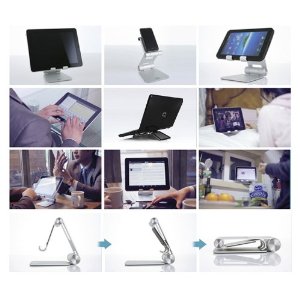
Check out this amazingly well designed and useful tablet stand, the Satechi R1 Arm Hinge HolderStand! Only about $49 on Amazon here. This stand allows you to tilt your tablet at a comfortable viewing angle and work hands free.
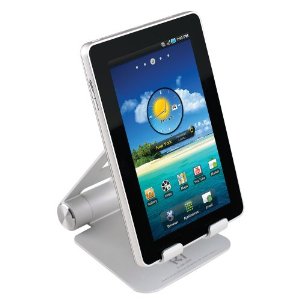
R1 Tablet Stand

Product Design

Satechi R1 is a desktop stand for any 7″ to 10″ tablet. Constructed from solid aluminum, the R1’s supporting grips are finished in rubber to hold your tablet securely in place. It’s compatible with most tablet cases. The R1 will hold your tablet at the right height and angle you determine to be for desktop use – useful for working with a Bluetooth keyboard, watching movies or video conferencing.

Technical Details

  • Compatible with 7″ to 10″ tablets:
    iPad,
    iPad 2,
    ASUS Eee Pad Transformer,
    Motorola Xoom,
    Samsung Galaxy Tab,
    Galaxy 10.1,
    ViewSonic gTablet,
    BlackBerry Playbook,
    HTC Flyer
  • Solid aluminum construction with rubber pads that hold surface for your tablet
  • Put your tablet in Portrait, Landscape or Flat-Angled orientation, change Height or Angle.
  • 270 degree mount hinge, 180 degree base hinge, folds away compactly into its pouch
  • Package includes: R1 Stand, pouch, user manual with 1 year warranty
Amazon reviewers say:

Bic: This holder was better than I expected.

Nicely machined aluminum with pads in the right places. Very good industrial design. Stiff enough to hold my Asus Transformer tablet securely in place in any viewing angle, but not so stiff as to make adjusting difficult

Fully deserves 5 stars.

Susan A. Ferraglio: The r1 stand is well built, sturdy yet of moderate size. The included carrying pouch is a nice added touch. I like the stand because it has protective rubber linings at all the contact points for the iPad. There are so many comfortable positions for typing landscape or portrait mode. In a folded position the iPad is close to the table surface for typing at a desk, the stand can be raised so the iPad can be held up for movie viewing or photo slide shows.

I use a Bear Motion leather iPad case (which I love) which I DO NOT have to remove when using the stand, Great convenience !

This stand is versatile because other electronics can be used as well. The iPhone fits nicely. It can held high for more comfort.

I also used my 13″ laptop in it but the joints were not strong enough to hold the laptop up high. It worked well when the stand was closed. The laptop was kept at a comfortable angle for use at a desk.

My only concern is the strength of the joints. They are very tight now. They easily hold up the iPad without moving. Over time they may weaken and I don’t see an easy way to tighten them if needed. Hopefully that will be a long way off. Build quality is very good. The finish is a satin-smooth finish – very even and clean.
I would definitely recommend this stand for its versatility, size and multiple positions.

Enhanced by Zemanta

Read Full Post »

By Sue Shekut, Licensed Massage Therapist, ACSM Personal Trainer, Certified Wellness Coach, Owner, Working Well Massage

Previously, I’ve blogged about the potential neck and shoulder pain that can result from using iPods and iPads. One way to save yourself from this problem is to get a stand or holder for your iPad so you do not need to hold it or lean far forward to view it.

The iPad looks great and works great. But with its sloping back and glass front it’s tough to handle. When you carry it, it’s awkward to hold and you get fingerprints all over it from grasping it. And when you’re using it, either your neck gets sore from staring downward or your arms and shoulders get tense from holding it up so you can see the screen.

Een Steve Jobs looks uncomfortable viewing the iPad

I came across this product, the Eazel-Stand and it looks like a nice fix. According to their website, you can position your iPad anywhere in 3D space for the most comfortable viewing experience. At your desk, in your reading chair, flat on your back in bed.

Use the Eazel Stand on the coach

Use the Eazel Stand on the plane, train or bus

How it works

Fold your eazel back and it transforms itself into the perfect desk stand. And with the patent-pending friction design, position the screen at any angle that is comfortable for you.

When you’re ready to go, simply close it up into a compact carrying case. Your iPad is fully protected and easy to handle.


Click here for an explanation of how the Eazel Stand works to prevent you from putting stress on your neck and shoulders.

Check it out here. Want to buy an Eazel-Stand. Sorry, it’s not yet available for sale!  But if you sign up or the newsletter, the company will let you know when you can order your own. Til then, try the PortaBook 10086 Multifunctional Laptop Book Document Stand for about $8 on Amazon!

Enhanced by Zemanta

Read Full Post »

By Sue Shekut, Owner, Working Well Massage, Licensed Massage Therapist, Certified Wellness Coach, ACSM Personal Trainer

A while ago I wrote about the ergonomic problems inherent is using the new iPad (and iPods and even reading books can put you in the same uncomfortable positions) Some people have theorized that Apple is counting on aftermarket vendors to come up with ergonomic products to support the nifty gadgets Apple creates.  And there are a slew of aftermarket products coming out now to make your “iViewing” more ergonomic. Below is a list of some of the aftermarket products I’ve found to help you more comfortably view your iPad, smart phone, etc.

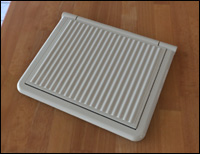
Portabook is still one of my favorites for its light weight portability, versatility, ease of use and cost. It’s not designed specially for the iPad, but it can be used to read books, cookbooks, for laptop use as well as your iPad. Why buy multiple stands when one device can work for them all! And the Portabook costs about $20 and weighs only ounces so it fits into a backpack along with your iPad easily. Hmmm, if my clients use the iPad and Portabook on the Metra their neck pain may disappear!

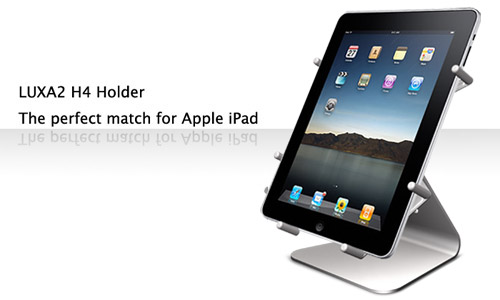
iLounge has a great review of a more versatile iPad holder here. iLounge recommends the Luxa2’s H4 iPad Holder  for its versatility, price and polish. iLounge says that the H4 is “an iPad-matching aluminum base with a cable managing slot, and a rotating, pivoting cradle with expanding rubber-tipped metal arms that can hold a bare or encased iPad as firmly as you prefer…it feels solid and sturdy even without an iPad resting in its cradle; but unlike Griffin’s A-Frame, all of its edges are polished to prevent iPad or finger damage.”

MacWorld also weighs in on the various aftermarket iPad stands. Their top vote mirrors that of iLounge: the Luxa2 H4 iPad Holder. Check out their other reviews here.

A fantastic story and video about this iPad stand designed and made by  75-year-old Dutch woodworker, Simon Blazer, is only $5!  Reviewed by Wired and CrunchGear already, this simply wooden block stand is what it is-just a stand. But ti’s also only $5.

Simon Blazer and his $5 wooden iPad stand

The Articulating Easel has one of the best web presentations about the ergonomics of iPad viewing here. Their product looks very similar to the Portabook but as of today, according to the website, its’ not yet available. Ha!  So you can subscribe to their mailing list and get a 10% discount on the product when it becomes available. I’d guess it will likely retail for about the same price as the PortaBook, maybe $20 to $30. But with so many other products ALREADY available, the Articulating Easel may be marketing for the competition.

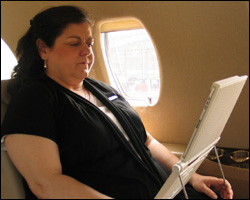
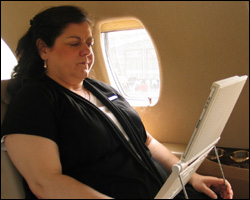
The Artculating Easel in use with an iPad

The  picture below shows the Articulating Easel in use on a plane. This is a great pic because it shows how much better you can sit using an iPad holder (although the Portabook could be used much the same way.)

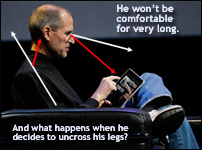
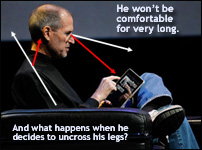
Here’s the Articulating Easel’s diagram showing Steve Jobs uncomfortable viewing angle with the iPad:

Steve Jobs viewing angle of iPad

The Articulating Easel also has a great page showing ergonomic issues with the iPad (and how aftermarket stands like the Articulating Easel can help!) Check out the ergonomic explanation here.

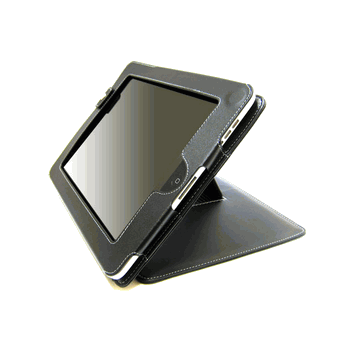
iGearUSA sells leather case that can hold the IPad and stand it up at a more comfortable viewing angle. Cost about $30.00. Check it out and order here.

iGear iPad Stand

There is also an iPad Holder for your car. Which I DO NOT recommend. It’s bad enough that we are distracted by cell phones, board advertising, and GPS systems. now we are going to use the iPad in our cars? A scary marriage of social networking (which is already a distracting, multitasking activity) with something dangerous like operating a motor vehicle. I see the day when municipalities and state governments ban iPad use in your car!

If you have an iPad, tell us about your ergonomic issues in the Comments section. Do you like/love/hate the iPad? What do you use it for? What is your most comfortable iPad viewing position? (Downward facing dog?!)

Enhanced by Zemanta

Read Full Post »