Feeds:
Posts
Comments

Posts Tagged ‘Android’

By Sue Shekut, Owner, Working Well Massage, Licensed Massage Therapist, Certified Wellness Coach, ACSM Personal Trainer

Check out this amazingly well designed and useful tablet stand, the Satechi R1 Arm Hinge HolderStand! Only about $49 on Amazon here. This stand allows you to tilt your tablet at a comfortable viewing angle and work hands free.
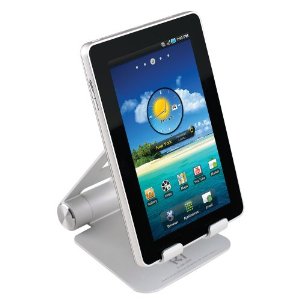
R1 Tablet Stand

Product Design

Satechi R1 is a desktop stand for any 7″ to 10″ tablet. Constructed from solid aluminum, the R1’s supporting grips are finished in rubber to hold your tablet securely in place. It’s compatible with most tablet cases. The R1 will hold your tablet at the right height and angle you determine to be for desktop use – useful for working with a Bluetooth keyboard, watching movies or video conferencing.

Technical Details

  • Compatible with 7″ to 10″ tablets:
    iPad,
    iPad 2,
    ASUS Eee Pad Transformer,
    Motorola Xoom,
    Samsung Galaxy Tab,
    Galaxy 10.1,
    ViewSonic gTablet,
    BlackBerry Playbook,
    HTC Flyer
  • Solid aluminum construction with rubber pads that hold surface for your tablet
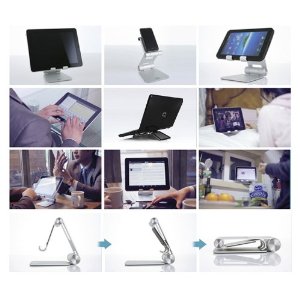
  • Put your tablet in Portrait, Landscape or Flat-Angled orientation, change Height or Angle.
  • 270 degree mount hinge, 180 degree base hinge, folds away compactly into its pouch
  • Package includes: R1 Stand, pouch, user manual with 1 year warranty
Amazon reviewers say:

Bic: This holder was better than I expected.

Nicely machined aluminum with pads in the right places. Very good industrial design. Stiff enough to hold my Asus Transformer tablet securely in place in any viewing angle, but not so stiff as to make adjusting difficult

Fully deserves 5 stars.

Susan A. Ferraglio: The r1 stand is well built, sturdy yet of moderate size. The included carrying pouch is a nice added touch. I like the stand because it has protective rubber linings at all the contact points for the iPad. There are so many comfortable positions for typing landscape or portrait mode. In a folded position the iPad is close to the table surface for typing at a desk, the stand can be raised so the iPad can be held up for movie viewing or photo slide shows.

I use a Bear Motion leather iPad case (which I love) which I DO NOT have to remove when using the stand, Great convenience !

This stand is versatile because other electronics can be used as well. The iPhone fits nicely. It can held high for more comfort.

I also used my 13″ laptop in it but the joints were not strong enough to hold the laptop up high. It worked well when the stand was closed. The laptop was kept at a comfortable angle for use at a desk.

My only concern is the strength of the joints. They are very tight now. They easily hold up the iPad without moving. Over time they may weaken and I don’t see an easy way to tighten them if needed. Hopefully that will be a long way off. Build quality is very good. The finish is a satin-smooth finish – very even and clean.
I would definitely recommend this stand for its versatility, size and multiple positions.

Enhanced by Zemanta

Read Full Post »

EveryTrail iPhone app
Image by chdot via Flickr

By Sue Shekut, Owner, Working Well Massage, Licensed Massage Therapist, Certified Wellness Coach, ACSM Personal Trainer

As you may have realized by now, I am a big promoter of hiking and exercising in the great outdoors. In 2010, technology and nature collide (and I am not taking about the oil spill, that’s a whole other story). Now smart phones like the Android, Blackberry and iPhone allow you to map your hiking and backpacking trails using GPS and geotagging.

How Everytrail Works

  • Map a trip route with your phone or GPS
  • Add trip photos to your map instantly
  • Add maps & photos to your blog or website
  • Explore and share in the EveryTrail community
  • Free app for iPhone, Android, Blackberry, Windows Mobile

Cool Examples of Trails Taken on Every Trail.com

• Hiking the Grand Canyon Rim-to-Rim click here.
• Half Moon Bay Coastal trail, CA click here.
• Kayaking Around Pennisula State Park’s pennisula in Door County Wisconsin click here.
• Backpacking North Country Trail, Brule River State Forest, Drummand, WI click here.
• Danada Forest Preserve and Heron Rookery, Wheaton, IL USA click here.
• Busse Woods Bike Trail – Illinois, click here.
• Chicago City Walk vs The Field Museum – Illinois click here.

Reblog this post [with Zemanta]

Read Full Post »

By Sue Shekut, Owner, Working Well Massage, Licensed Massage Therapist, Certified Wellness Coach, ACSM Personal Trainer

I have to come clean and admit it, I am an Android user. Although I love Mac products overall, the iPhone’s marriage with AT&T did not sway me away from the clearer phone connections and fewer dropped calls I get from Verizon. (And, no, Verison is not paying me to say this!  I used to use Cingular (now AT&T) and had to switch to Verizon to save my business when I dropped a client call 4 times using Cingular.)

I know some of my clients do have iPhones so a while ago, I posted about Iphone apps that help you get healthy here. But what about us Android users? Mashable.com, a top social media guide, has a great list of the top 8 Android Apps for health and fitness. Here’s a brief summary of their list. Go to the original blog post to read more here including info on cost of the apps and screen shots of each app.

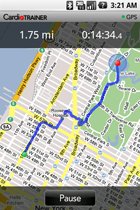
Cardio Trainer Screen Shot

CardioTrainer + Racing–combining two apps to help motivate you to run a better race. Cardio Trainer can be combined with a weight loss app as well.

Fast Food Calorie Counter-let’s you find the healthiest choices from among Fast food options. This app provides calories, fat grams, fiber, carbs and protein for 72 fast food restaurants. Watch the video review here.

Endomondo Sports Tracker–tracks time, distance, speed and altitude. it also gives you a history of your workouts. This app also integrates with Googlemaps making it a great resource for runners, hikers and those out for a fitness adventure!

Calorie Counter by FatSecret–this app provides calorie and nutrition facts. It incorporates a bar code scanner to help you find the healthiest food options and calculates the recommended daily intake to help you achieve your fitness and weight goals.

AllSport GPS– this app lets you track your routes, distance covered, time your speed and even the calories you burn when running or hiking. The app also provides you with maps, virtual races, down loadable routes and elevation info.

Beer Gut Fitness–this app tells you how many calories you consume with each beer or glass of wine and how much exercise and what type of exercise to do to burn those calories!

Absolute Fitness–an app that combines the best of all apps and lets you track your food intake, exercise routine and monitor your fitness goals.

and finally, my favorite app:

Backpacker GPS Trails
–this app acts as a hand held trip database and personal navigation gizmo. use it to track your own hikes, geotag photos and videos, share your trips with others. it provides you with download maps to find trails that include thousands of trips taken by Backpacker magazine.

Read the entire list with screen shot pics, pricing and app size info at Mashable.com here.

For 101 Great Android Apps, go here.

Reblog this post [with Zemanta]

Read Full Post »